Respawn & zone timers
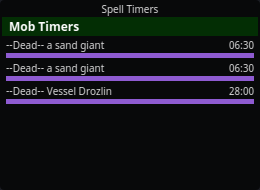
When you kill a mob, nParse+ starts a respawn countdown automatically — using per-NPC respawn times where they're known (a database covering 121 zones, ported from EQTool), or the zone's default respawn time otherwise.
Where timers show up
- As purple rows in the Mob Timers section of
Timers, named
--Dead-- <mob>. - On the map, when the kill matches a spawn point — the countdown draws at the spawn location.
Behavior
- Timers survive camping. Respawn timers are saved per character and restored (elapsed time subtracted) when you log back in — a 6-hour named camp doesn't reset because you took a break. Unlike your own buffs and cooldowns, respawn rows are not hidden while you are camped: a mob's spawn clock is the world's, not your character's, so it stays on screen and keeps counting. See Camping and logging back in.
- Duplicate kills get numbered. Killing two of the same mob while both
timers run gives the second a
_1suffix (--Dead-- a bat, then--Dead-- a bat_1); further kills take the smallest free number. Once a timer expires its name frees up and is reused, so the list stays tidy instead of climbing forever. - Expiry announcements — optionally get an on-screen and spoken announcement when a respawn timer hits zero ("Announce respawn-timer expiry" in Settings → Timers).
- Shared timers — with sharing on and "Share timers" enabled for your character, kill timers flow to your groupmates on the PigParse network (and theirs to you), so the whole group sees the same camp clock. The Kael Avatar of War lockout and dragon roar timers are shared network-wide the same way.
/considera mob to see its respawn time in Mob Info before you commit to the camp.- Don't want them on screen? Hide the whole Mob Timers section with "Show mob timers" in Settings → Timers (timers keep running, expiry announcements still fire) — or right-click a wrong timer in the overlay to clear it by hand.
Manual spawn points
Right-click the map to place a spawn-point marker anywhere and start its timer by hand — useful for camps the database doesn't know or PH cycles you want to track visually. Markers persist across restarts. See Maps.
Pop windows
Big raid targets don't respawn on a fixed clock. After time-of-death a base time elapses, and only then does the mob become poppable — at any moment until a latest-possible time. Trakanon is TOD + 4.5 days, then a 12-hour window.
A timer row can carry that shape. It counts down to the window opening
in the ordinary timer colour, then flips in place — same row, same
position in the list — to an orange countdown prefixed POP, running to the
latest possible spawn. It leaves the window when the window closes, not when
the base time runs out.
- The bar means the phase you're in. Before the window it fills over the base respawn; inside it, over the window itself. So a row that is 30 minutes into a 12-hour window reads as nearly full rather than parked on empty.
- Sorting follows the window. A row inside its window sorts on the time left in the window, so it takes its honest place in the list instead of pinning to the top for twelve hours.
- Camping keeps them, in either phase. A window that opened while you were away comes back open, without re-announcing itself; a window that closed while you were away is dropped, like any expired timer.
- Expiry announcements say both ends. With "Announce respawn-timer
expiry" on, a
--Dead--row speaks when its window opens ("spawn window open") as well as when it closes. Same setting, no new option.
When a mob has more than one possible window
Some spawns have several candidate windows and nobody knows which one
they will use — Lodizal has three. Each candidate gets its own row, sharing
the mob's name and labelled (1 of 3), (2 of 3), (3 of 3).
They behave the way the uncertainty does: every candidate counts down to its own opening, opens, and lapses if the mob does not appear, leaving only the chances still to come. So the list always answers "is a window open right now, and how many chances are left?" without any arithmetic.
- Announcements name the chance. "Lodizal spawn window 2 of 3 open" — a bare announcement could not say which one came up, nor how many remain.
- Clear the whole set in one action. When the mob finally pops, its other candidate windows are answered too: right-click any of its rows and choose Clear all 3 windows, rather than clearing them one at a time.
- The label keeps its original denominator. After the first chance lapses the second still reads "2 of 3", not "1 of 2" — you are being told which candidate this was, not how many are left.
Where the numbers come from
nParse+ ships the mechanism but no per-mob window data, and there is
no way to type a time of death in yet — both are planned. Until then a
plugin supplies the figures through
ctx.add_window_timer() — or
ctx.add_window_series() for a mob with several candidate windows (SDK
1.3). See examples/plugins/tod_window.py in the repository for a
working one covering both shapes.