Settings → Windows
A grid with one row per window — Maps, Discord, Timers, DPS Meter, Mob Info, Console, Trigger Editor, Macro Editor, Character Dumps — and three columns:
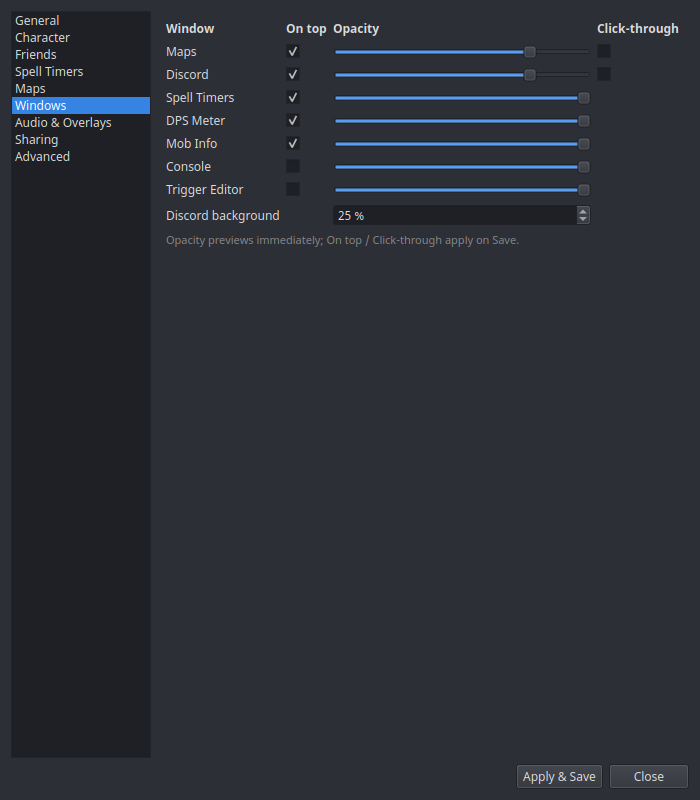
| Column | What it does |
|---|---|
| On top | Keep the window above the game (what makes an overlay an overlay). Applies on Save. |
| Opacity | Window transparency — previews live as you drag the slider. |
| Click-through | Clicks pass straight through to the game. Great for HUD-style overlays; remember you'll need to come back here to turn it off, since you can no longer click the window. Applies on Save. Only on the rows that offer it — see below. |
The Discord row has an extra Discord background opacity slider, which controls the overlay's backdrop separately from the window itself.
Which rows offer Click-through
Maps, Discord, Timers, DPS Meter and Mob Info. These are the windows you draw over the game and read at a glance, so passing clicks through to EQ is the point of them.
Console, Trigger Editor, Macro Editor and Character Dumps do not, on purpose. They're tool windows you drive with the mouse — a tree you click, a form you fill in, a right-click menu that is the only way to reach half the feature. A config surface you can't click isn't a HUD, it's a screenshot.
Settings has no row at all, and that's structural: this page is the only thing in nParse+ that turns click-through back off, so it has to stay clickable. (The Event Overlay has no row either — it is always click-through, so its alerts never eat a click meant for the game. Position it from tray → Position Event Overlay.)
Click-through means the window stops responding to the mouse — all of it
Not just left-clicks. Right-click menus, dragging the window, resizing it from an edge, and click-to-dismiss on the Timers window's expiry flash all stop working, because the OS delivers no input to the window at all. A hover-reveal title bar doesn't help — it's part of the same window.
The way back is always the same: tray → Settings → Windows →
untick it. The tray menu and the in-game toggle_ commands only show and
hide a window; they don't change this flag, and neither does Reset
Window Positions or a saved window layout.
Upgrading from nparse?
nparse had a click-through box for its spells window, and that setting is carried across when nParse+ imports your old config. If your Timers window has been ignoring the mouse since you switched, this is why — untick Click-through on its row.
Plugin windows
If you run add-ons, any window they open gets its own
row too, below a Plugin windows separator and labelled
<add-on name> — <window title>. They carry On top, Opacity and
Click-through and work exactly like the built-in rows — nothing extra to
install, and nothing the add-on's author had to do.
Click-through on an add-on window is the same bet as on Timers, with the same way back: this page. Worth thinking about first if the add-on's window is one you interact with rather than one you watch.
Two things worth knowing:
- Only add-ons that actually opened a window this session get a row. One you disabled, one that errored on load, one you uninstalled — none of them appear. Their saved opacity isn't discarded, it just sits in your settings until the add-on comes back. The list follows the add-on as you toggle it: tick its box in Settings → Plugins and its row appears here with no restart, untick it and the row leaves with the window.
- An add-on can only offer a row for a window it built on the nParse+ overlay base. Most do, since that is what the SDK hands them. One that builds a plain Qt widget instead still opens from the tray, but nParse+ has no opacity, on-top or click-through state to give you for it.
Window positions aren't set here — drag the windows themselves, and use tray → Window Layouts to save named position presets (Windows & Overlays).