Settings → Character
nParse+ keeps a profile per character (created automatically the first time it sees a character's log). The Character page edits the profile selected in the top dropdown — switch characters in game and the active profile follows.
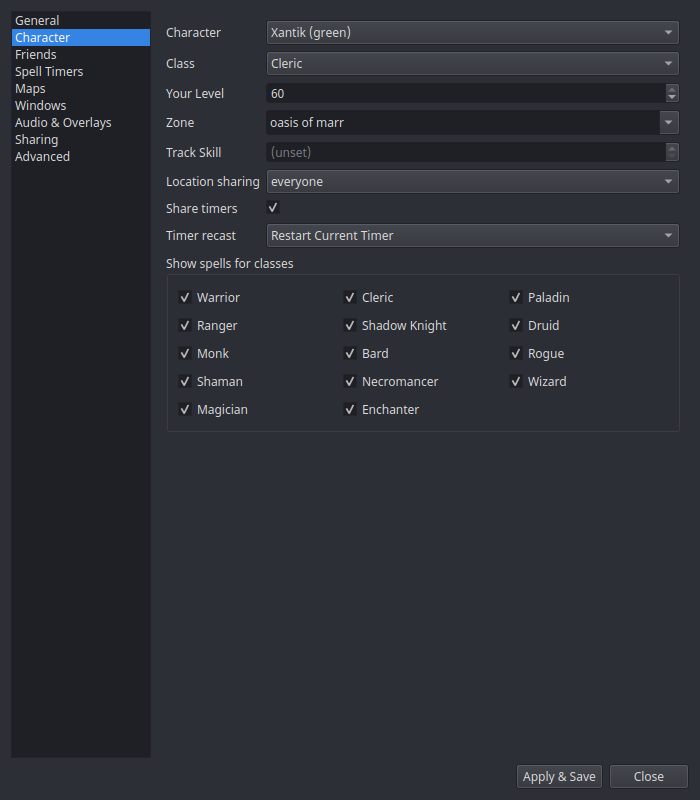
| Setting | What it does |
|---|---|
| Character | Which profile you're editing. |
| Class / Your Level | Drive spell-duration math for Timers — a level 60 enchanter's Clarity lasts longer than a level 20's. Auto-filled from your own /who row (and from level-up / class-detect log lines); a quick /who in game refreshes them, even while this window is open. |
Clicky items are timed from your level
On Project 1999 an item's effect is cast as if you cast the spell
yourself, at your own level — so a level 60 character clicking a
low-level item gets the full level-60 duration, and the spell's own cap is
what limits it. The at Level N shown on a P99 wiki item page is the level
at which you may begin clicking the item, not the level it casts at.
nParse+ v2.28.2 briefly had this backwards and timed clickies from the item's level, which under-reported them; it is fixed.
| Zone | The character's current zone — auto-detected from zone-change lines and from a plain /who (a global /who all carries no zone, so it can't update this). |
| Track Skill | Your tracking skill; draws the tracking-radius circle on the map for Druids/Rangers/Bards. |
| Location sharing | Per-character: everyone / guild-only / off. Guild-only shows your dot only to guildmates (Sharing). |
| Share timers | Whether this character's kill timers are shared to (and received from) the network. |
| Timer recast | What happens when a tracked detrimental is recast mid-timer: Restart Current Timer or Start New Timer (stacked rows). Roots always refresh. |
| Show spells for classes | Per-class filter checkboxes — hide spell timer rows for classes you don't care about (e.g. hide warrior discs on your cleric). |