Timers
The Timers overlay lists every active spell, buff, debuff, cooldown, counter, and ad-hoc timer as a row with a name, remaining time, and a thin progress bar — grouped by target, with your own buffs (You) always first.
Within each group, rows are ordered by time remaining (soonest-to-expire first) by default; switch to alphabetical with the Sort timers by dropdown in Settings → Timers. Counters (which have no countdown) always sort last under time remaining.
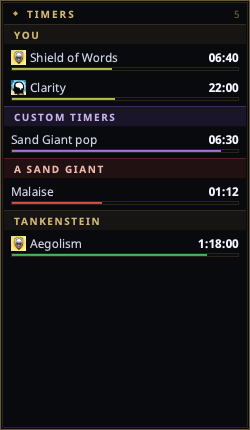
Open it from the tray → Timers.
How rows get there
When you (or someone near you) casts a spell, nParse+ matches the cast message against the real spell database and starts a countdown scaled to the caster's level and class — which is why setting your class and level in Settings → Character matters. Rows disappear when the timer expires or when the log reports the effect worn off.
Bar colors carry meaning:
| Color | Meaning |
|---|---|
| Green | Beneficial effect (buff, song) |
| Red | Detrimental effect (debuff, DoT) on the target |
| Blue | Cooldown (e.g. Harm Touch, Lay on Hands, discipline reuse) |
| Purple | Ad-hoc timer (mob/roll timers, custom trigger and chat-command timers, respawn timers) |
| Amber | Random-roll tracking window |
Each bar also shifts toward red as its timer runs down, so a buff that is about to drop stands out without reading the digits. Boat and roll timers keep their color — their bars measure a schedule, not a countdown you started, so a fade would be misleading. Turn the fade off with Fade timer bars to red in Settings → Timers.
Spell rows show their gem icon from the spell data.
Useful behaviors
- Your timers survive camping — see Camping and logging back in below.
- Buff-fade warnings — get a color change and optional spoken warning N seconds before a buff drops (Settings → Timers).
- Stacked detrimentals — recasting a debuff before it fades either restarts the row or stacks a new one, following EQTool's per-spell behavior (roots always refresh). Configurable per character (Timer recast in Settings → Character).
- Class filters — hide spell rows that don't matter to your class ("Show spells for classes" in Settings → Character).
- Show only your own spells and guess ambiguous spells toggles live in Settings → Timers. Ambiguous casts (several spells share one cast message) show a best guess when enabled.
- Correct a guess — when several spells share one cast message the name on the row is a guess. Right-click it for Other matches and pick the spell it really was; the row is relabeled and its countdown recomputed from that spell's duration against the time it started, so the elapsed time is kept rather than restarted. Rows whose cast message named exactly one spell have no such submenu.
- Fold a section away — click any group header to collapse it; click it again to bring it back. See Collapsing sections below.
- Hide whole sections — don't care about Boats, Mob Timers, Roll Timers, or Custom Timers? Each built-in section (and random rolls) has its own show/ hide toggle in Settings → Timers. Hiding is display-only; the timers keep running underneath.
- Right-click to clear timers — right-click a row for Clear '(name)', a section header for Clear group, or anywhere for Clear other players' timers (drops everyone else's spell rows but keeps your own buffs and mob timers) or Clear all timers. (With click-through enabled the overlay ignores all clicks, including right-clicks — toggle click-through off first.)
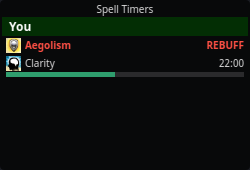
- Flash on expiry (rebuff prompt) — flag a spell via its right-click Flash on expiry action and, once it expires, its row stays on screen flashing as a rebuff/recast prompt instead of disappearing. Left-click the flashing row to dismiss it. The context action adds the spell to the per-spell allowlist and turns on the global toggle; tune the flash time (and turn the feature off) in Settings → Timers. Click-to-dismiss needs click-through off (click-through means the OS delivers no clicks).
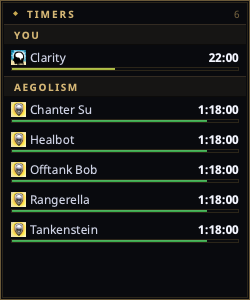
- Raid mode grouping — with Group buffs by spell (raid mode) enabled in Settings → Timers, the buffs you cast on other players flip to spell-headed groups whenever they cover more distinct targets than distinct spells — one header per spell, one row per target — so a raid-wide buff reads as a single spell over many people. Your own buffs, NPC targets, the built-in sections, and detrimental/cooldown rows keep target headers. Orientation is recomputed every render, so it never gets stuck.
- You choose the size — drag the bottom-right corner grip to resize; the window keeps that size (persisted across restarts) and scrolls when there are more rows than fit, instead of growing down your screen and staying huge after the timers clear.
Raid mode turns a raid-wide buff into one spell header with a row per target:
A buff flagged Flash on expiry stays on screen flashing REBUFF until you left-click to dismiss it:
Collapsing sections
In a raid — or at a busy camp — the window stacks up enough sections that the rows you actually care about get pushed off the bottom. Left-click a group header to fold that section shut. Its rows come off the window and the header stays behind as a one-line stub, marked with a ► and carrying the number of rows it is holding, so a folded group is never silently forgotten:
► JOE (7)
Click the stub again to unfold it. Everything folds — your own You buffs, a player or NPC target, the built-in Mob/Roll/Custom/Boats sections, and the spell headers raid mode creates.
Folding is display-only, exactly like the per-section show/hide toggles in Settings: nothing is cleared, the timers keep counting, and buff-fade warnings and expiry announcements still fire from inside a folded section. The count in the window's title bar keeps counting folded rows too.
Two details worth knowing:
- Folds survive a restart, per section, and they survive the section leaving the window: fold Joe and the fold is still there the next time Joe takes a buff.
- Headers are still drag handles. A press that moves the window is a drag, not a click, so dragging the overlay by a header does not fold it. And with click-through enabled the overlay gets no clicks at all — including these — so turn click-through off first.
Camping and logging back in
When a camp completes, the rows that belong to you come off the window and are saved to that character's profile. Camping with 20 minutes of Clarity no longer means coming back to nothing, and a character who is not logged in no longer leaves timers on your screen.
| While camped | When you log back in | |
|---|---|---|
| Your buffs | frozen and hidden | back with the same time remaining |
| Your cooldowns (Lay on Hands, Harm Touch, mend, disciplines, spell recast, memorize) and bard counters | hidden, still counting | back with the real elapsed time deducted — or gone, if they came up while you were away |
| Boats, roll windows, custom/shared timers, mob respawns | untouched, still visible and counting | unchanged |
Buffs freeze and cooldowns don't because that is what the game does: a reuse timer runs in the real world whether or not you are logged in, and a buff on a character sitting at the character-select screen does not tick.
Everything is saved per character, so camping one character and logging in
another brings back that character's timers and leaves the first one's saved
where they are. Abandoning a camp (You abandon your preparations to camp.)
before it completes changes nothing at all.
Two things worth knowing:
- Log out with
/campor/quit, not by pulling the plug. Both write the camp countdown to the log, which is nParse+'s cue to save. A link death writes nothing, so nParse+ can only fall back on the last thing your log said: your timers are saved as of the last line the game wrote, which is usually within a second or two of when you dropped, but can be minutes stale if you went link dead while idle in a silent zone. - The save happens when the camp completes, so buffs that would have expired during the countdown are already gone from it.
Related
- Respawn & zone timers also render here (purple rows) when a mob dies.
- The legacy per-target spells window from original nParse is still reachable via the tray, but this overlay is its replacement.