Trigger Editor
The Trigger Editor is a framed tool window for browsing, editing, and testing every trigger — the ~65 built-ins and your own custom ones. It has two tabs: Triggers (the editor) and Activity (a log of what actually fired).
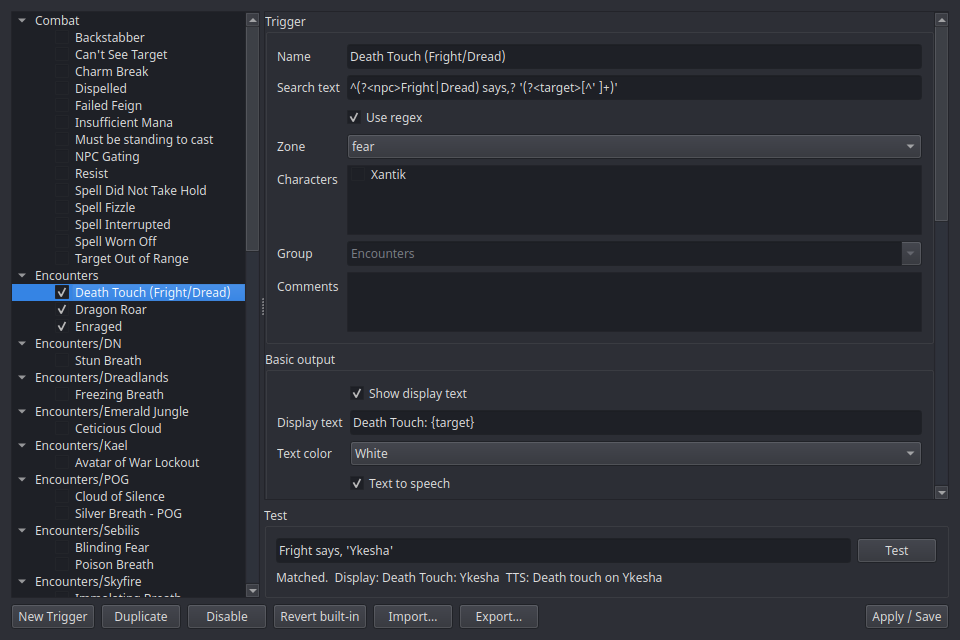
Open it from the tray → Trigger Editor.
Layout
- Left: folder tree — built-in folders (raid AOEs, utility, …) plus your own categories. Checkboxes enable/disable individual triggers or whole folders.
- Right: the editor form — everything about the selected trigger:
- Search text — the text to match, as plain text or a regex
(checkbox). Tokens like
{name}and{c}capture parts of the line. - Zone gating — restrict the trigger to specific zones.
- Characters — check the character profiles this trigger applies to; leave all unchecked to keep it global. Only fires while a checked character is logged in (see character scope).
- Text output — the alert text shown on the Event Overlay, its color, and whether it's spoken via TTS.
- Timer output — an optional CountDown/CountUp timer bar: duration, bar color, restart behavior (start new / restart / do nothing), and separate "timer ending" / "timer ended" alerts.
- Counter — count occurrences and expose
{COUNTER}in the output. - Bottom: the test box — "Paste a log line…" runs a real log line through the trigger's actual matching machinery and shows whether (and what) it would fire. Copy lines out of the Console.
The Activity tab
GINA's trigger console, with a shortcut back to the trigger. Every time a trigger fires, a row lands here — newest at the top:
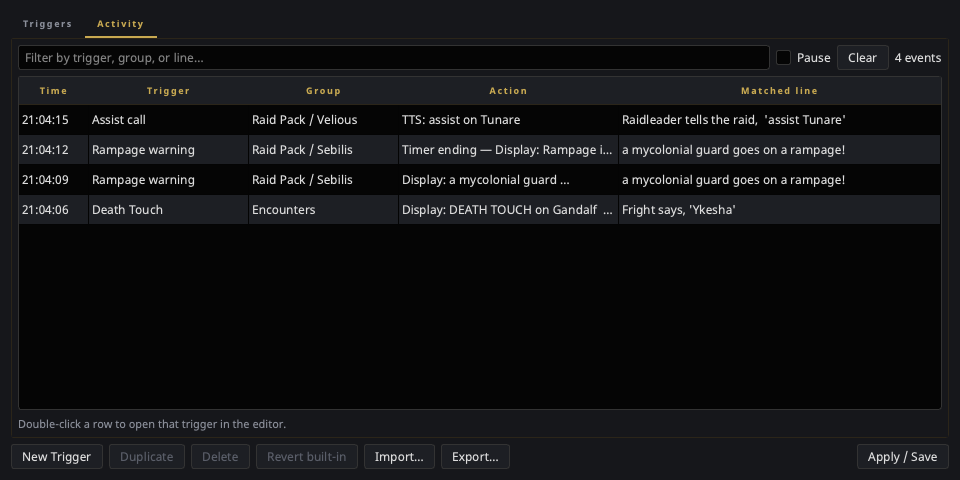
| Column | What it tells you |
|---|---|
| Time | When it fired |
| Trigger | Which trigger it was |
| Group | Which folder it lives in — for a GINA import, the full nested path (Raid Pack / Sebilis) |
| Action | What it did, with tokens already filled in: the display text, the spoken phrase, the timer it started |
| Matched line | The log line that set it off |
Double-click any row to open that trigger in the Triggers tab. That's the point of the tab: when an imported pack fires something you didn't expect, you go from "what was that?" to editing the culprit in one click. (Right-click gives you the same jump plus Copy matched line.)
Timer follow-ups are logged too, greyed out so the real matches stay easy to scan: Timer ending, Timer ended, and Timer ended early when an end-early pattern cancels a countdown — the one thing that used to make timer bars vanish with no explanation.
The filter box narrows by trigger name, folder, action, or log line; Pause freezes the list while you read it; Clear empties it. The log holds the last 500 fires and is session-only — nothing is written to disk. It records from the moment nParse+ starts, so the history is already there the first time you open the window.
A trigger you can't find
A trigger that fires but shows nothing still gets a row (marked (no output)) — that's usually the one you're hunting. And if a row's trigger has since been deleted, the double-click simply does nothing.
Editing rules
- Nothing takes effect until Apply — edits happen on a copy.
- Built-ins can be edited (they're marked customized) but never deleted: for a built-in, Delete becomes Disable, and Revert restores the stock definition.
- Custom triggers can be created, moved between folders, and deleted freely.
Import & export
Export… saves the current tree selection (a trigger, a folder, or —
with nothing selected — everything you'd want to share) to a JSON file;
Import… reads those files and GINA .gtp packages. Details in
Sharing triggers.
For the full trigger model — tokens, timers, counters, examples — see the Triggers feature guide.