Respawn & zone timers
When you kill a mob, nParse+ starts a respawn countdown automatically — using per-NPC respawn times where they're known (a database covering 121 zones, ported from EQTool), or the zone's default respawn time otherwise.
Where timers show up
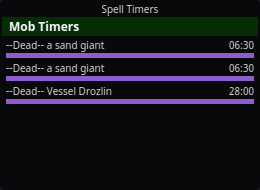
- As purple rows in the Mob Timers section of
Spell Timers, named
--Dead-- <mob>. - On the map, when the kill matches a spawn point — the countdown draws at the spawn location.
Behavior
- Timers survive camping. Respawn timers are saved per character and restored (elapsed time subtracted) when you log back in — a 6-hour named camp doesn't reset because you took a break.
- Duplicate kills get numbered. Killing two of the same mob while both
timers run gives the second a
_1suffix (--Dead-- a bat, then--Dead-- a bat_1); further kills take the smallest free number. Once a timer expires its name frees up and is reused, so the list stays tidy instead of climbing forever. - Expiry announcements — optionally get an on-screen and spoken announcement when a respawn timer hits zero ("Announce respawn-timer expiry" in Settings → Spell Timers).
- Shared timers — with sharing on and "Share timers" enabled for your character, kill timers flow to your groupmates on the PigParse network (and theirs to you), so the whole group sees the same camp clock. The Kael Avatar of War lockout and dragon roar timers are shared network-wide the same way.
/considera mob to see its respawn time in Mob Info before you commit to the camp.- Don't want them on screen? Hide the whole Mob Timers section with "Show mob timers" in Settings → Spell Timers (timers keep running, expiry announcements still fire) — or right-click a wrong timer in the overlay to clear it by hand.
Manual spawn points
Right-click the map to place a spawn-point marker anywhere and start its timer by hand — useful for camps the database doesn't know or PH cycles you want to track visually. Markers persist across restarts. See Maps.