Maps
The Maps window draws the community Brewall/P99 map for your current zone with your live position on it — nParse's signature feature, extended with EQTool's NPC database.
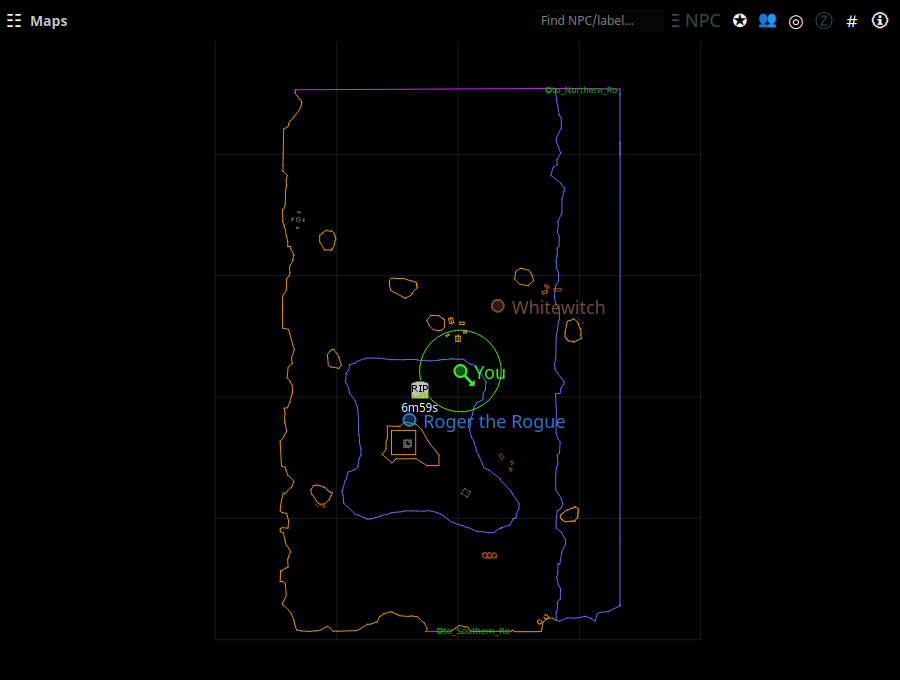
Open it from the tray → Maps. The map follows your log: zoning switches
maps automatically, and each /loc you type updates your marker (with a
direction arrow inferred from your movement).
Your position and others'
- You are the marker with the direction arrow. Type
/locin game to update it (many players bind/locto a movement key or use a hotbar macro). - Other players appear as colored dots when sharing is on — theirs and yours flow over the PigParse network (interoperating with EQTool users) or your own nparse websocket server. Names hover next to dots; a per-map toggle can hide others' dots (Settings → Maps).
- Tracking radius — Druids, Rangers, and Bards get a circle showing their tracking range (set your Track skill in Settings → Character).
NPC search and the notables list
- Type in the Find NPC/label… box to search map labels, the zone's notable NPC list, and — for anything not found locally — a live P99 wiki lookup. Click a result to flash its location on the map.
- ☰ NPCs lists the current zone's notable NPCs with their respawn times.
Spawn points, waypoints, and corpses
- Right-click the map to create a spawn point or waypoint at that spot. Spawn points start a respawn countdown you can see on the map; markers persist across zone changes and restarts.
- Corpse waypoints are dropped automatically when you die, so you can find your way back. On the nparse sharing wire, corpse locations can be shared with your group.
- Respawn countdowns also appear as rows in Spell Timers; see Respawn & zone timers.
Display options
Zoom with the scroll wheel; drag to pan. In Settings → Maps:
- line/grid width and label size
- z-axis fading — floors above/below you fade out smoothly, tuned per zone (enable, opacity floor, strength, fallback height)
- per-Z-layer opacity, other-players toggle
The map also supports path recording (record a route through a zone as you run it) via the map's right-click menu, and Load Map to view any zone's map without being there.