Settings → Spell Timers
Behavior toggles for the Spell Timers overlay and timer engine. (Per-class spell filters live on the Character page.)
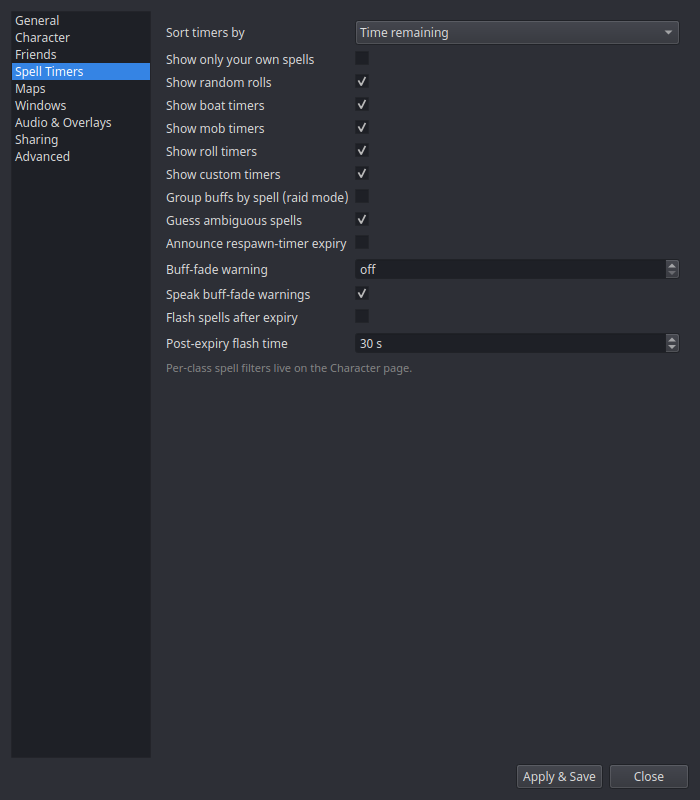
| Setting | What it does |
|---|---|
| Sort timers by | Row order under each header: Time remaining (default) puts the soonest-to-expire row at the top, or Alphabetical by name. Counters (which never expire) always sort last under Time remaining. |
| Show only your own spells | Hide the spell rows other players cast. Boats, mob/roll/custom timers, counters, and rolls are unaffected. |
| Show random rolls | Show /random results as amber rows (Combat tracking). |
| Show boat timers | Show the Boats section (boat schedule countdowns). |
| Show mob timers | Show the Mob Timers section: mob respawn/Sirran countdowns and FTE raid rules (97%/96%/5-minute). |
| Show roll timers | Show the Roll Timers section: Ring 8 and Scout Charisa server roll windows. |
| Show custom timers | Show the Custom Timers section: countdowns started by triggers, chat commands, and shared remote timers. |
| Guess ambiguous spells | When several spells share one cast message, show the best guess instead of nothing. |
| Announce respawn-timer expiry | Speak/alert when a respawn timer hits zero. |
| Buff-fade warning | Seconds of remaining time at which a buff row switches to its warning state (0 disables). |
| Speak buff-fade warnings | Also speak the warning via TTS. |
| Group buffs by spell (raid mode) | Opt-in. When the buffs you cast on other players cover more distinct targets than distinct spells, those buffs flip to spell-headed groups (the spell is the header, each target is a row) so a raid-wide buff reads as one spell over many people. Off by default; targets stay the headers. Your own buffs, NPC targets, the built-in timer sections, and detrimental/cooldown rows never flip. |
| Flash spells after expiry | Opt-in. Keep an expired spell's row on screen for the flash time below, flashing as a rebuff/recast prompt — only for spells you've added to the per-spell allowlist. Add spells via each row's right-click → Flash on expiry (which also enables this toggle); left-click a flashing row to dismiss it. |
| Post-expiry flash time | How many seconds a flagged spell keeps flashing after it expires (default 30). |
The category toggles are display-only: hidden timers keep running in the background (respawn-expiry audio still fires), and re-enabling a category brings its rows straight back.
The per-spell post-expiry allowlist (post_expiry_flash_spells) is built
from the row context menu rather than a settings field — see
Spell Timers window. Click-to-dismiss needs the
spell window out of click-through mode (click-through means the OS delivers no
clicks).