Mob Info
The Mob Info overlay shows everything nParse+ knows about the last mob you
/considered: name, zone, respawn time, whether it's a notable (named)
spawn, a pet indicator, and — when connected to the
PigParse network — its known loot with recent
auction prices.
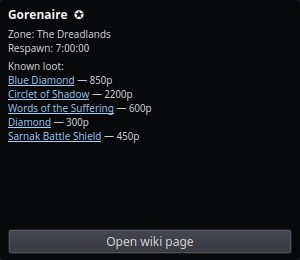
Open it from the tray → Mob Info, then /consider (or just /con) any
mob in game.
What you see
- Name and zone, with a notable flag when the mob is a named/rare spawn worth camping.
- Respawn time from the per-NPC database (ported from EQTool, covering 121 zones) — the same data that drives respawn timers.
- Pet indicator when the target is another player's pet (so you don't waste a camp check on it).
- Known loot with prices — the mob's drop list with PigParse's 6-month weighted-average WTS prices, when the network layer has the data. Each loot row links to its P99 wiki page.
- Open wiki page button for the mob itself.
Notes
- Prices come from pigparse.org's auction scraping and require the PigParse sharing mode to be active; without it you still get name/zone/respawn/notable from local data.
- Window position, opacity, and click-through persist in Settings → Windows.