Spell Timers
The Spell Timers overlay lists every active spell, buff, debuff, cooldown, counter, and ad-hoc timer as a row with a name, remaining time, and a thin progress bar — grouped by target, with your own buffs (You) always first.
Within each group, rows are ordered by time remaining (soonest-to-expire first) by default; switch to alphabetical with the Sort timers by dropdown in Settings → Spell Timers. Counters (which have no countdown) always sort last under time remaining.
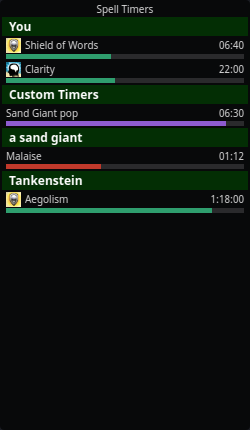
Open it from the tray → Spell Timers.
How rows get there
When you (or someone near you) casts a spell, nParse+ matches the cast message against the real spell database and starts a countdown scaled to the caster's level and class — which is why setting your class and level in Settings → Character matters. Rows disappear when the timer expires or when the log reports the effect worn off.
Bar colors carry meaning:
| Color | Meaning |
|---|---|
| Green | Beneficial effect (buff, song) |
| Red | Detrimental effect (debuff, DoT) on the target |
| Blue | Cooldown (e.g. Harm Touch, Lay on Hands, discipline reuse) |
| Purple | Ad-hoc timer (mob/roll timers, custom trigger and chat-command timers, respawn timers) |
| Amber | Random-roll tracking window |
Spell rows show their gem icon from the spell data.
Useful behaviors
- Self-buffs survive camping — your own buffs are saved per character and restored (with the elapsed time subtracted) when you log back in.
- Buff-fade warnings — get a color change and optional spoken warning N seconds before a buff drops (Settings → Spell Timers).
- Stacked detrimentals — recasting a debuff before it fades either restarts the row or stacks a new one, following EQTool's per-spell behavior (roots always refresh). Configurable per character (Timer recast in Settings → Character).
- Class filters — hide spell rows that don't matter to your class ("Show spells for classes" in Settings → Character).
- Show only your own spells and guess ambiguous spells toggles live in Settings → Spell Timers. Ambiguous casts (several spells share one cast message) show a best guess when enabled.
- Hide whole sections — don't care about Boats, Mob Timers, Roll Timers, or Custom Timers? Each built-in section (and random rolls) has its own show/ hide toggle in Settings → Spell Timers. Hiding is display-only; the timers keep running underneath.
- Right-click to clear timers — right-click a row for Clear '(name)', a section header for Clear group, or anywhere for Clear other players' timers (drops everyone else's spell rows but keeps your own buffs and mob timers) or Clear all timers. (With click-through enabled the overlay ignores all clicks, including right-clicks — toggle click-through off first.)
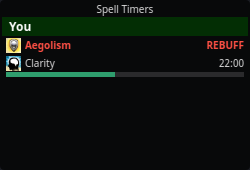
- Flash on expiry (rebuff prompt) — flag a spell via its right-click Flash on expiry action and, once it expires, its row stays on screen flashing as a rebuff/recast prompt instead of disappearing. Left-click the flashing row to dismiss it. The context action adds the spell to the per-spell allowlist and turns on the global toggle; tune the flash time (and turn the feature off) in Settings → Spell Timers. Click-to-dismiss needs click-through off (click-through means the OS delivers no clicks).
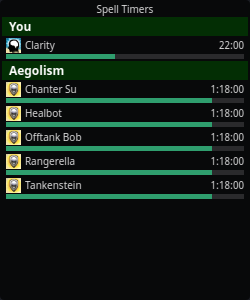
- Raid mode grouping — with Group buffs by spell (raid mode) enabled in Settings → Spell Timers, the buffs you cast on other players flip to spell-headed groups whenever they cover more distinct targets than distinct spells — one header per spell, one row per target — so a raid-wide buff reads as a single spell over many people. Your own buffs, NPC targets, the built-in sections, and detrimental/cooldown rows keep target headers. Orientation is recomputed every render, so it never gets stuck.
- You choose the size — drag the bottom-right corner grip to resize; the window keeps that size (persisted across restarts) and scrolls when there are more rows than fit, instead of growing down your screen and staying huge after the timers clear.
Raid mode turns a raid-wide buff into one spell header with a row per target:
A buff flagged Flash on expiry stays on screen flashing REBUFF until you left-click to dismiss it:
Related
- Respawn & zone timers also render here (purple rows) when a mob dies.
- The legacy per-target spells window from original nParse is still reachable via the tray, but this overlay is its replacement.