Settings Reference
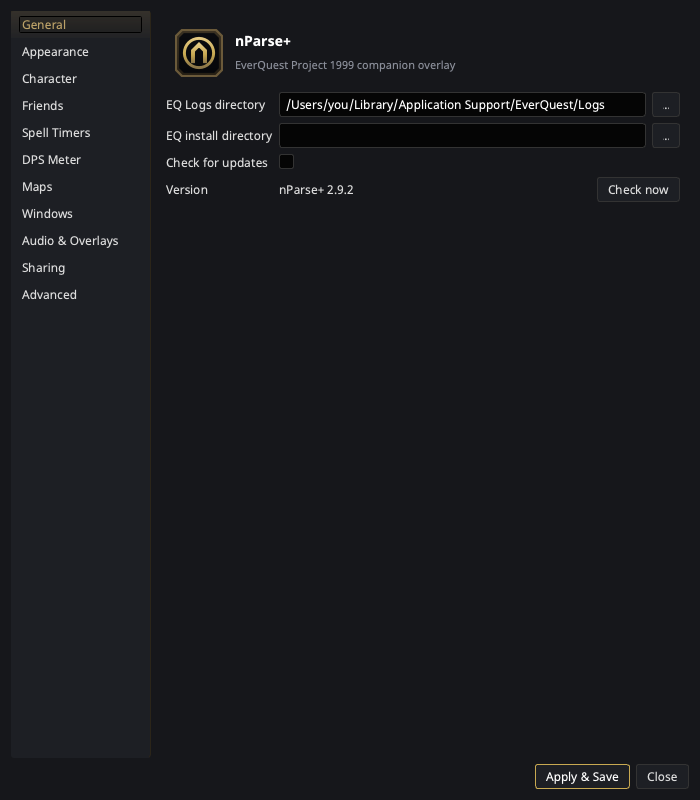
Open nParse+ Settings from the tray. Settings are organized into sidebar pages, documented one-per-page here, mirroring the app:
| Page | Covers |
|---|---|
| General | Log/install directories and updates |
| Appearance | Overlay skin, UI/overlay font size, and on-game alert styling |
| Character | Per-character profiles: class, level, sharing, spell filters |
| Friends | Friends-list merge and push |
| Spell Timers | Timer behavior toggles and buff-fade warnings |
| DPS Meter | What the meter counts: damage sources, pets, windows |
| Maps | Line widths, label size, other players, backdrop, z-fade |
| Windows | Per-window on-top / opacity / click-through |
| Audio & Overlays | TTS voice/volume, alert durations |
| Sharing | Network mode, pigparse.org account, character dump upload |
| Advanced | Log archiving, macro sync, add-ons switch, Night Vision fix |
| Plugins | Optional, off by default — only appears once add-ons are enabled in Advanced |
Apply & Save writes everything to disk; Close discards pending edits. Almost everything then applies to the running app — voices, alert durations, counting rules, the dump destination, the spell database behind your EQ install directory. The overlay skin previews as soon as you pick it, and the UI/overlay font size applies to open overlays when you save.
Two things still need a restart, and the page says so where you set them:
- Turning location sharing on, or switching between the pigparse and nparse networks (Sharing). Turning it off applies immediately.
- Enabling add-ons, and any install, uninstall or enable/disable of one (Advanced, Plugins).
Settings persist to settings.json in your
platform config directory.
You never need to edit the file by hand, but it's plain JSON if you want
to back it up or sync it between machines.