Event Overlay
The Event Overlay is a full-screen, fully click-through transparent layer that sits over the game and renders these kinds of content:
- Alert text — big centered outlined messages from triggers (raid AOE warnings, failed feign, charm break, …), in the trigger's color, cleared automatically. The alert panel is centered within its configured region in every skin; other overlay windows keep their normal row and column alignment. See How alert text is laid out for the two rules that decide how it is shown.
- Timer bars — countdown bars stacked bottom-center (AOE countdowns, trigger timers). Re-triggering a bar restarts it; bars vanish at zero.
- CH chain lanes — one lane per heal target with green chips sliding across it, one per CH call. See CH chains. When the CH cadence indicator is on, a muted marker on a lane's second-cell shows the cadence the raid leader called (Settings → Audio & Overlays).
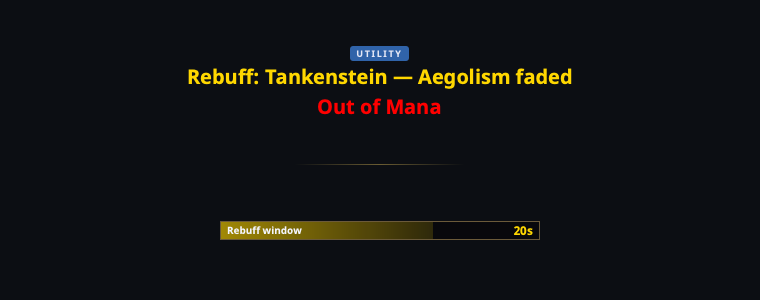
- Utility — a dedicated header section for utility alerts (rebuff requests, out-of-mana). The Rebuff Request and Out of Mana built-in triggers (in the Utility folder, disabled by default) render here.
The Utility section groups rebuff/out-of-mana alerts under their own header (a CH-lane cadence marker rides above it):
It never intercepts clicks, has no window chrome at all, and hides itself when there's nothing to show — most of the time you forget it exists until a dragon roars.
How alert text is laid out
Two rules, and both are deterministic — nothing about your display text is guessed at.
The small gold label
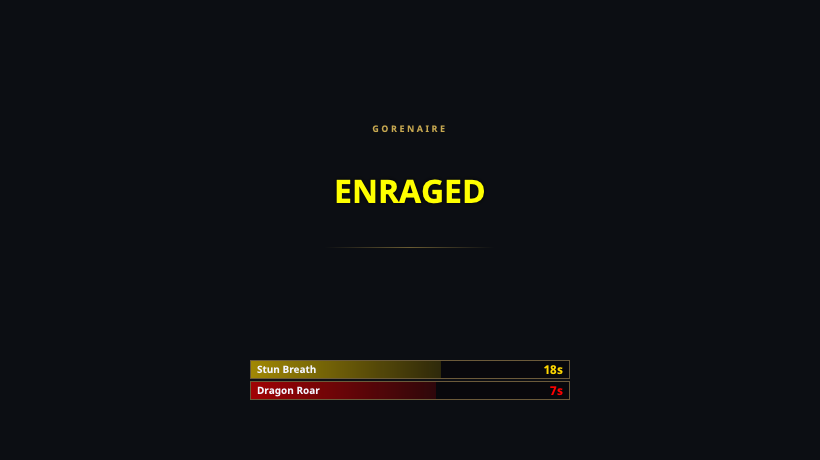
An alert is shown as one headline unless it begins with a short name followed by a separator, in which case that name becomes the small gold label above it:
Gorenaire — ENRAGED→ GORENAIRE / ENRAGEDDeath Touch: Soandso→ DEATH TOUCH / Soandso
Precisely: the first —, --, - or : in the text splits it,
and only if everything before that separator is
- at most 28 characters,
- at most 4 words, and
- free of
[ ] ( ) { } < > | / *.
Anything that fails a single one of those is shown whole, at one size —
including the common raid-mob info dump, which used to lose its opening
clause to the gold label because it happened to contain - further along:
<Dozekar The Cursed> [Slowable, baneable] - [CH Unslowed: 2s, Slowed: 4s] // …
The split is presentation only. A trigger's reset text still matches against the whole string, exactly as you typed it.
Long text: shrink, then scroll
Alert text that does not fit its Alerts region is shrunk until it does, down to a readable floor. Text still too long at that floor — a paragraph of mob notes — then scrolls slowly upward through the region instead of being cut off at the bottom.
The scroll is paced off the alert text duration (Settings → Audio & Overlays): it pauses on the first lines, walks the rest, and is timed to arrive before the alert clears. It is also capped at a readable rate, so an alert long enough that finishing would need a blur runs at the readable rate and shows as much as it can — give it a longer duration, or a taller Alerts region, if you want the rest.
Positioning it
Tray → Position Event Overlay shows the overlay's outline with a size grip so you can drag and resize it to sit exactly over your game window. Double-click to lock it in place when you're done. The geometry persists.
In position mode each region (CH chains, Alerts, Timer bars, and the Utility section) is outlined with a dashed border and can be laid out on its own:
- drag inside a region to move it;
- drag a region's edge or corner to resize it (the cursor changes when you are over one).
A region's size sticks. For CH chains, Timer bars and Utility it is a
minimum — a sixth timer bar still grows the region rather than being cut off.
For Alerts it is exact, because that is the box the alert text is fitted
into: make it taller to get more of a long alert on screen at once, or
shorter to keep alerts compact. It stops shrinking once it is down to one
line of the smallest headline plus its gold label — below that there would be
nothing left to fit text into. That minimum depends on your UI / overlay
font size, so if an Alerts region saved earlier (or edited by hand in
settings.json) is shorter than the current font needs, it is raised back to
the minimum rather than left too short to show anything.
Tip
Make the overlay match your EQ window, not your whole monitor — alert text centers within the overlay region, so a full-monitor overlay on a windowed game puts alerts outside the game view.
The alert's compact kicker follows the shared UI / overlay font size. Its large headline uses the independent Alert headline size control; both are on Settings → Appearance.
Tuning
In Settings → Audio & Overlays:
- Alert-text duration — how long alert text stays up (default 4 s) unless the trigger clears it earlier.
- CH-lane retention — how long an idle CH lane lingers after its last call (default 20 s), so healers keep a stable anchor per heal target.