Console
The Console is a plain scrollback of raw log lines with timestamps — the easiest way to check that nParse+ is reading your log, and the best friend of anyone writing triggers.
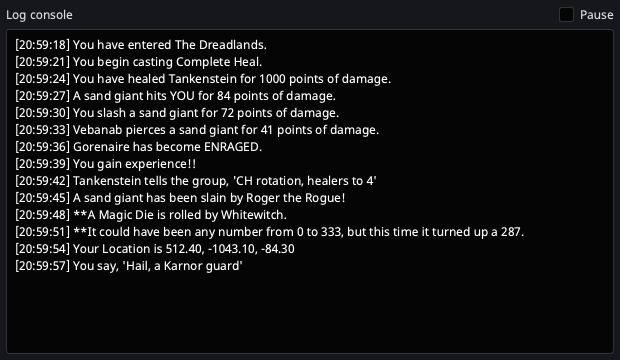
Open it from the tray → Console.
- Right-click a line → Create trigger from this line… opens the
Trigger Editor with a new trigger already filled in
and already reporting
Matched.against that line. See Create a trigger from a log line. - Pause (checkbox, top right) freezes the scrollback so you can copy a line — e.g. to paste into the Trigger Editor's test box.
- The buffer keeps the most recent 2,000 lines.
- Unlike the overlays, the Console is a normal framed window by default (not always-on-top, not translucent) — it's a utility, not a HUD.
Create a trigger from a log line
Right-click any row and pick Create trigger from this line…. The
Trigger Editor opens with a new, enabled trigger in
your Custom group: the search text is built from the line, the display
text is prefilled, the test box below already holds the line, and the result
already reads Matched.. Nothing has been saved yet — edit what you want,
then Apply.
The search text is a pattern, not a paste. Two substitutions are offered so the trigger fires again next time rather than only for the line you saw:
| The line | The suggested search text |
|---|---|
Gorenaire begins to cast a spell. |
{name}\ begins\ to\ cast\ a\ spell\. |
Gorenaire hits Soandso for 500 points of damage. |
{name}\ hits\ {c}\ for\ 500\ points\ of\ damage\. |
{name} is a capture you can use in the output text; {c} is your
character (see Tokens). Everything else is
escaped, so punctuation, brackets and quotes match literally — the
backslashes are that escaping, and they are correct.
When a substitution was made, the menu offers a second entry — Create trigger from exact text… — which makes a plain-text trigger matching that one line word for word. Take it when the name in the line is the whole point ("only tell me about Gorenaire").
Some lines get no substitution and only the first entry appears: your own
You … lines, and mobs written with a lowercase name after an article
(A cliff golem hits YOU …), where nParse+ can't tell where the name ends.
Add the token by hand if you want one.
The timestamp is never part of the trigger: nParse+ matches lines with the timestamp already stripped, so a pattern containing one would never fire.
One rare case worth knowing: if the log line itself contains something that
looks like a token — someone typing cast {c} on me in a tell — the
prefilled display text drops the braces (cast c on me). Output text is
expanded before it reaches the overlay and there is no way to escape a
literal brace there, so copying it through would make the alert announce
your own character name instead of what was said. The search text is
unaffected and still matches the braces exactly.
Typical uses
- First-run check: say something in game; if it shows up here, the whole pipeline is live (First run).
- Trigger authoring: right-click the line you want to match and let the editor fill itself in — or find the exact line, copy it, and paste it into the Trigger Editor's "Paste a log line…" test field.
- Bug reports: grab the lines around a misbehaving timer or parse.