DPS Meter
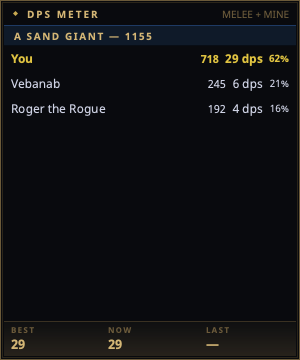
The DPS Meter is a frameless overlay showing live damage breakdowns: one header per fight target with the group's total damage, one row per attacker beneath it, and a session Best / Current / Last footer.
Open it from the tray → DPS Meter.
Reading it
Each attacker row shows, left to right:
- Name (with level when known from the shared
/whoroster — see Sharing) - Total damage dealt to that target this fight
- Trailing DPS — damage over the last 12 seconds, the same window EQTool uses, so numbers are comparable across tools
- % of the group total
Your own row is highlighted. So is your pet's, which is marked (pet) —
see below.
The title bar carries the counting mode (MELEE, MELEE + MINE, ALL) so
an empty caster row reads as a filter rather than a broken parser. Change it
in Settings → DPS Meter.
Upgrading and playing a caster?
Your existing setting is carried over as-is, so a config from 2.4 or earlier still counts melee only. Set Count damage from to melee + my spells to have your own spell damage counted — see below.
Casters: how spell damage is counted
EverQuest logs spell, proc and damage-over-time damage as
Gorenaire was hit by non-melee for 1250 points of damage.
That line names no attacker at all — not you, not the wizard next to you. So a meter can either drop it (and show a caster nothing) or credit it to you (and pad your row with the whole raid's nukes). nParse+ does neither by default. It uses the one signal your own log gives: your casting.
Non-melee damage that lands while you are casting, or within the credit
window after, is counted as yours. Damage that arrives cold is not. With
All damage selected it is still added to the target's group so the
percentages stay honest, listed under (spell damage) rather than under
your name.
What this cannot do, said plainly:
- Damage shields and weapon procs follow no cast of yours, so they land in the unattributed bucket. A tank's proc damage is under-counted.
- Two casters nuking the same target inside one window are indistinguishable. This is a large improvement over "always you", not a proof.
- Damage over time never appears, in any mode. Project 1999 does not log DoT ticks at all — the per-tick message is a 2003 addition that was removed for not being classic — so no parser on P99 can show it.
Pets
Your pet keeps its own row, marked Vexer (pet) and highlighted like
yours. Two rows rather than one is deliberate: whether the pet is holding up
(and whether it is still alive) is worth seeing on its own, and merging the
rows would make the per-row DPS and biggest hit meaningless.
By default the pet is counted as its own attacker, the way every other row is: your session Best / Now / Last footer is your own hands. If you read the pet as part of your output — a magician, necromancer, beastlord or charming enchanter usually does — turn on Count pet damage as mine in Settings → DPS Meter and the footer becomes the two of you together. It is off by default because that is a question about how you want to count, not something the meter should decide for you.
The pet is recognised by name, tracked through summon, reclaim, death and charm break. Another player's pet is never counted as yours; a charmed pet sharing a mob's name is not either.
When a pet dies part-way through a fight its row stops being marked as yours — you no longer have a pet — but the damage it already did stays in your footer for that fight. A pet you resummon mid-fight gets its own row, and both count.
How fights are tracked
- A fight starts when damage lands on a target and ends when the target dies or the fight goes quiet.
- The session footer tracks your best, current, and last fight DPS; a fight must last more than 20 seconds to count toward Best, so one lucky crit on a rat doesn't top your session.
- Your best DPS persists per character profile.
Notes
- Only what the log reports can be counted: your hits, your pet's hits, and melee around you. Other players' spell damage isn't attributable from your log, so raid-wide totals are approximate — same limitation as every log parser.
- Counting rules live in Settings → DPS Meter and all apply without a restart.
- Window position, opacity, always-on-top, and click-through persist in Settings → Windows.