Macro Editor
The Macro Editor is a framed tool window for browsing and editing a character's in-game macros ("socials"), copying a macro set onto your other characters, and sharing it as a file. See Macros & socials for the concepts.
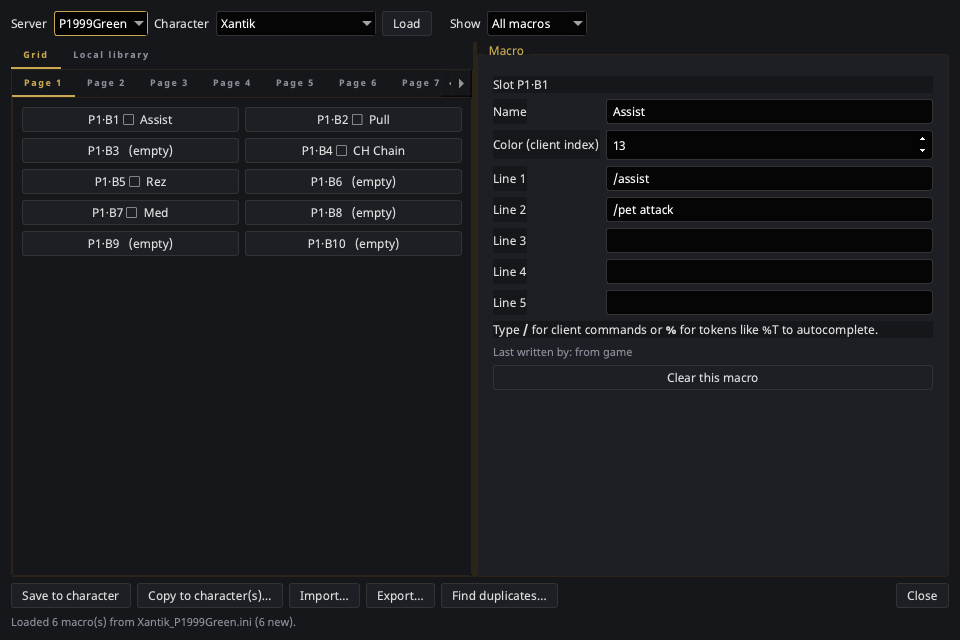
Open it from the tray → Macro Editor. It needs the EQ install directory set in Settings → General.
Layout
- Top bar — pick the Server (P1999Green, P1999Blue, P1999Red, Real-Test) and Character, then Load. The Show filter dims slots that don't match an origin, rather than hiding them, so positions stay readable.
- Left: Grid tab — one tab per macro page, each a grid of button
slots. A slot shows its position, an origin badge, a
⧉marker when it duplicates another macro, and the macro's name. Empty slots say so. - Left: Local library tab — the mirrored copy of this character's macros, grouped by origin. Macros the client has since dropped appear as not in file, with Restore from local copy beside the count.
- Right: the macro form — Name, Color, and up to five command
lines, plus a line naming who last wrote this slot and Clear this
macro. The command lines
autocomplete: type
/for client commands,%for tokens like%T.
The page grid mirrors the in-game socials window, which also makes free slots obvious — useful when an import offers to move a macro out of a taken slot.
Buttons
| Button | What it does |
|---|---|
| Load | Reads the selected character's macros and refreshes the local copy. |
| Save to character | Writes the working copy to that character's .ini. |
| Copy to character(s)… | Replicates this set onto other characters — writes immediately. |
| Import… | Merges a macro pack into the working copy. |
| Export… | Writes a macro pack, defaulting to only what you authored. |
| Find duplicates… | Lists duplicate groups and jumps to a slot. Changes nothing. |
Editing rules
- Nothing reaches the
.iniuntil Save to character — edits happen on a working copy. Closing with unsaved changes prompts you. - Copy to character(s)… is the exception: it writes its targets straight away, like the friends push does. Its confirm dialog names the characters and says whether it will replace or merge.
- Import never writes — it only fills the working copy, and says so.
- Grid dimensions are read from your own file rather than assumed, so a client build with more pages, buttons, or lines works unchanged. An imported macro that would land outside your grid is reported instead of written.
Safety
- Every file is copied into
socials_backup/beside it before its first write, and that first copy is never overwritten. - Saving warns — but does not stop you — when the EQ client looks to be running, because it rewrites these files on camp and logout. See the warning in Macros & socials.
- Only the
[Socials]section is rewritten. Other sections of the file, unrecognised keys, comments, and blank lines are preserved exactly. - Sync macros when EQ exits (Settings → Advanced) keeps the local copy current without opening this window. It only reads your EQ directory — it never writes macros back into the game.
Colour is a number
Color is the client's own palette index, shown as a raw number. The P99 palette mapping isn't verified, and a swatch showing the wrong colour would be worse than an honest index.