Settings → Maps
Display tuning for the Maps window.
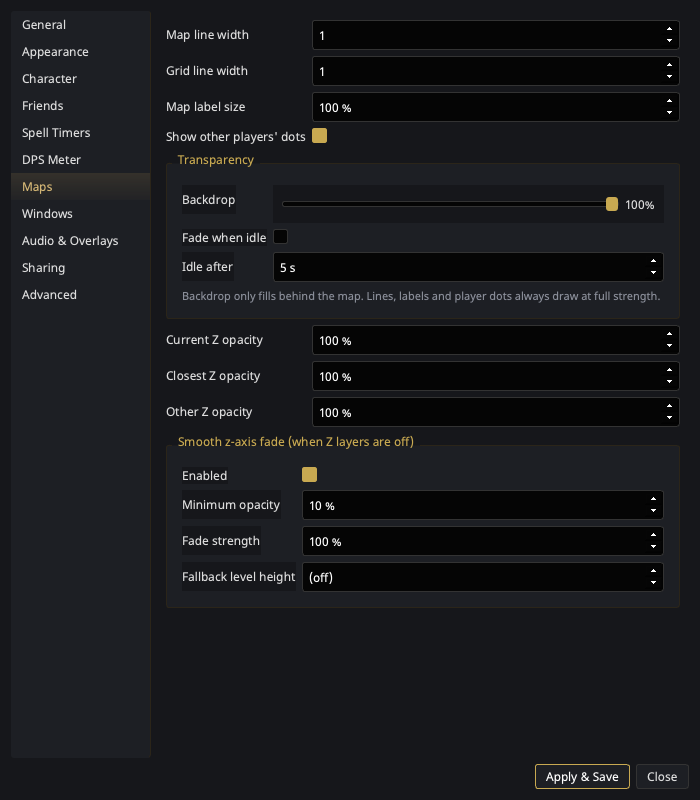
| Setting | What it does |
|---|---|
| Map line width | Thickness of map geometry lines. |
| Grid line width | Thickness of the coordinate grid. |
| Map label size | Scales POI labels, player names, and spawn countdowns. |
| Show other players' dots | Master toggle for shared player dots (Sharing). |
| Pan the map with | Whether a plain click and drag pans the map, or whether it takes Ctrl + click and drag. Applies immediately. |
| Per-Z-layer opacity | Opacity per elevation layer when explicit Z layers are on. |
Panning
Panning used to be Ctrl + drag only, with nothing on screen saying so — a plain drag did nothing at all, and "I cannot drag the map" is what that looks like from the outside. So Click and drag is the default, and
- Ctrl + drag still pans under either setting. Picking Ctrl + click and drag only turns the plain drag back off; it never takes the modifier gesture away.
- The change applies to a map that is already open — no restart.
The scroll wheel is unaffected either way: it zooms, Ctrl + wheel steps the Z layer, and a wheel near a map edge nudges the backdrop (below). A plain drag that starts in that same edge band does not pan, so reaching for the border of a frameless window still means the border; Ctrl + drag pans from there as it always has.
Transparency
Two controls, not one — because one number was doing two jobs.
| Setting | What it does |
|---|---|
| Backdrop | Alpha of the fill behind the map. 0% is glass — geometry floating on the game. ~60% separates the lines from whatever is behind them. 100% reads like a paper map, for when you have parked and are planning a route. |
| Fade when idle | Drop the backdrop to nothing after a few seconds of no input, so a map you are not touching stops inking the game. Touching it brings your value straight back. |
| Idle after | How long "not touching it" means. |
Backdrop only fills behind the map — lines, labels and player dots always draw at full strength. That is the difference from the map's window opacity on the Windows page, which fades the whole window, geometry included: turning the map see-through with that one also dims the lines you were trying to read.
Without a settings trip
Scroll the wheel near a map edge to nudge the backdrop up or down mid-pull. Away from the edges the wheel still zooms as it always did.
Smooth z-axis fade
When explicit Z layers are off, geometry far above or below you fades out smoothly instead of switching layers — tuned per zone, with these knobs:
| Setting | What it does |
|---|---|
| Enabled | Turn the smooth fade on/off. |
| Minimum opacity | The floor — geometry never fades below this, so upper floors stay faintly visible. |
| Fade strength | How aggressively opacity falls off with vertical distance. |
| Fallback level height | Assumed floor height for zones without tuned level data. |