Settings → Sharing
The network switch, and the optional pigparse.org account. Background: Sharing & PigParse.
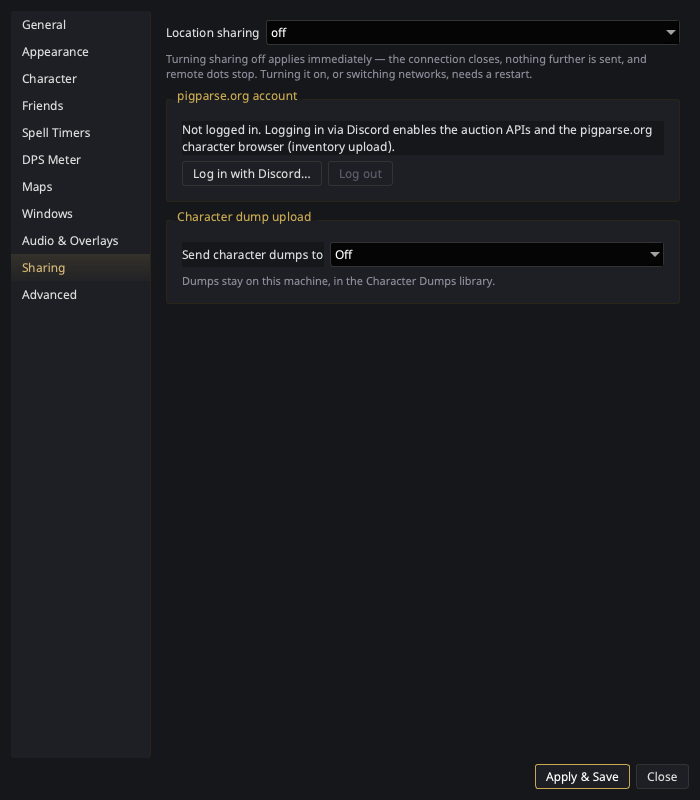
| Setting | What it does |
|---|---|
| Location sharing | The global mode: pigparse (the public hub EQTool uses), nparse (self-hostable websocket), or off. |
Each direction applies differently, and the page says so:
- Turning it off applies immediately. Hit Apply and the connection
closes, and remote dots, waypoints, dragon roars and shared timers stop
arriving. The tray's sharing line reads
off. Nothing further is published either — the/whoroster sync and the NPC-activity posts that carry your last/locstop with it, the same state as launching with sharing off. (Character dump upload is not affected: that is its own setting, below.) - Turning it on — or switching between pigparse and nparse — needs a
restart. The network client and the handlers that publish through it are
built at startup. That includes turning it back on after turning it off
in the same session: nothing resumes, neither the map dots nor the
publishing, until you restart. The tray's sharing line says so —
pigparse — restart to connect.
Per-character everyone/guild-only/off switches and the Share timers toggle live on the Character page — the global mode picks the network; the character settings decide what that character sends.
pigparse.org account
| Control | What it does |
|---|---|
| Log in with Discord… | Opens your browser for pigparse.org's Discord OAuth login; the status line shows progress. The resulting token is stored locally in your settings. |
| Log out | Clears the token. |
An account is not required for map dots, shared timers, or feeds — only for uploading to pigparse.org's character browser (below), and not even for that if you send your inventory to p99planner instead.
Character dump upload
One picker, Send character dumps to, because both destinations publish the same character to a different website:
| Destination | What it needs | Takes | What happens |
|---|---|---|---|
| Off (default) | — | — | Dumps stay on this machine, in the Character Dumps library. |
| pigparse.org character page | The Discord login above | Inventory | Typing /outputfile inventory in game uploads the dump to your pigparse.org character page. |
| p99planner.com | Nothing | Inventory and spellbook | The export is staged at p99planner.com and a review page opens in your browser, where you approve the import. No account, no API key, no login. |
Picking pigparse.org here does not turn on location sharing, and it never
makes this client publish anything else to pigparse.org: the /who roster
sync and the NPC-activity feed belong to Location sharing above, and stay
off unless that is set to pigparse. Uploading a dump with the sharing mode on
nparse sends the dump and nothing more.
/outputfile spellbook only has somewhere to go with p99planner.com
picked — pigparse.org's character browser has no spellbook page. With
pigparse picked, a spellbook is still collected into the library; it just
isn't published.
p99planner never applies anything without you approving it on that page, and later dumps in the same session join the same review link for 24 hours — a character's inventory and spellbook show up there as one entry. The link is private — treat it like a password; see Character Dumps.
Whichever you pick, uploading is fed by the same scan that fills the Character Dumps library, so that window's auto-import has to be on (it is by default) for a dump to be noticed automatically.
What uploads on its own is deliberately narrow:
- Only dumps taken during the current session. Ones already sitting in the EQ folder at launch are collected locally but never published.
- Only from the EQ directory — the automatic scan, and Import now. A file chosen with Import file… is filed away and never uploaded: it may be a backup, an export off another machine, or another player's dump, and none of those were offered up for publishing by being picked in a file dialog.
- Auto-update does not affect it either way. That setting decides how much local history to keep and has no say in what leaves your machine.
For anything outside that — an older dump, a hand-imported one, or a whole mule roster at once — use Upload dumps in the Character Dumps window.
Changing the destination takes effect when you press Apply — no restart, and the same is true of logging in with Discord and picking pigparse.org in the same visit.
Switching away from a destination stops uploads immediately, including any dump still queued and waiting to be sent — the destination is re-checked at the moment each upload leaves, so nothing already in the pipe reaches a site you have just turned off. The connection it was using is left idle for the rest of the session rather than torn down, which is what keeps a p99planner review link you have not approved yet from being lost.